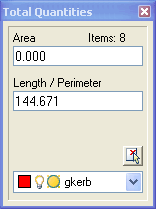
This tool helps you interactively calculate total areas and lengths of objects in the drawing.
To open the dialog, select Landscape > Quantities and Grading > Total Areas and Lengths or type 'Art' at the command prompt. A floating window will open in the workspace allowing selection of objects to measure in the drawing.
All objects having an area, length or perimeter property will be added together and displayed. You can filter object selections by layer using the drop down list at the bottom of the dialog