 Total Quantities
|
Landscape
Menu
|
The PlantManager menu provides shortcuts to keyboard commands as well as utilities and tools.
The Layer Utilities, Drawing Utilities, Quantity Utilities and the Grading sections of the menu provide some general drawing and calculation aids. Click this link for more detailed information about utility routines.
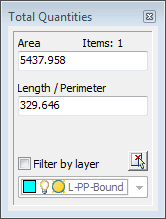
Total QuantitiesThis tool helps you interactively calculate total areas and lengths of objects in the drawing.
To open the dialog, select PlantMan > Quantities and Grading > Total Areas and Lengths or type 'art' at the command prompt. A floating window will open in the workspace allowing selection of objects to measure in the drawing.
All objects having an area, length or perimeter property will be added together and displayed. You can filter object selections by layer using the drop down list at the bottom of the dialog
This utility will substitute one plant block for another. The command works like the 'Match Properties' tool. To start the command, type 'trs' at the command prompt or click on the 'Substitute Trees' menu item. Select a source block and then select any number of destination blocks. All objects must have been previously created by the Plant Manager.
The first selected destination block is used as a filter which ensures that only blocks matching that object will be included in the subsequent selection.
Specify image folders to be searched when using the Data Browser view. Multiple directories may be specified. Images of format, .jpg, .bmp, .tif, and .png will be displayed if found and if matching the botanic name of the selected entry. Multiple images of the same list entry may be displayed by appending a numerical suffix or prefix to the file name.
This utility provides a tool to query and set the scale of a paper space viewport. To run this utility type 'msc' at the command prompt or click on the menu item.